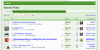
Watched threads and others

Last Resort

Active Member
When I make a contribution to a thread, it immediately disappears from the general run of threads and is only visible under Watched Threads. Why is this and is there anything I can do to force all threads to appear? On other forums (not necessarily family history), all threads and 'my' threads are overlapping sets and not mutually exclusive sets. It's useful to see at a glance what is active and not have to look in two places.

I can, of course, achieve what I want by failing to log in (which I often do), but that seems to be contrary to the ethos of the forums.:)
 
Hi Last Resort, as many members may answer one particular post, they fall off the bottom of the list & may be found here:
upload_2016-7-20_19-12-43.png
to find posts hover on your name just under the tree,click in your content & your posts should come up.

Your News Feed
Conversations
Alerts
Likes You've Received
Your Content
People You Follow
People You Ignore
Two-Step Verification
Your Blog Drafts
Your Bookmarks
 
Last edited:
When I make a contribution to a thread, it immediately disappears from the general run of threads and is only visible under Watched Threads. Why is this and is there anything I can do to force all threads to appear? On other forums (not necessarily family history), all threads and 'my' threads are overlapping sets and not mutually exclusive sets. It's useful to see at a glance what is active and not have to look in two places.

I can, of course, achieve what I want by failing to log in (which I often do), but that seems to be contrary to the ethos of the forums.:)

I always seem to get lost when I am logged in! I usually only log in to write something then log out again as it is less complicated for me that way......

Have read your advice Wendy - but still seems an overly tricky process. Technology isn't always my thing I'm afraid!
 
Ta, Ma! :D But that's more than I want. I'm like Grizel and prefer to keep it simple. It's great that you can bring up your stuff if you want to, but what I really want is just to click on New Posts and see at a glance what's been going on. I can do that when I'm not logged in, but, if I decide to show myself, the result is different and I have to mess around in two places. I think my preferred way is common on other forums, so why different here?

John
 
Assuming you've opted to follow the thread, there's another, very easy way.

View attachment 4672

Click on Watched Threads.​
Hmm I have just clicked on watched threads and amazingly there is a very small selection there but by no means all of the threads I have contributed to. But then I have never knowingly clicked on follow thread!

I am with John - I would like to be able to click on recent posts when logged in and see all recent posts including my own, just as when not logged in.

Edit ah I have now clicked on view all watched threads and there they are! Am on a steep learning curve today!:)

But would still prefer a simpler route....
 
I think I am going to disagree; I like it the way it is. I can see immediately what I have read already (or rather I can't see it as it's not there ;)), this seems tidier to me. Threads will reappear if someone adds to them, or else I can search for them or do any of the things mentioned above if I need to find them again.

But then I don't really have experience of other forums and their workings, so maybe it's just a case of what I am used to.
 
I'm with Muggy on this, it seems to be a very neat and clear way of presenting the threads and I like it. I always know what I've already read and which threads have been added to. I never log out and can get straight in to TD via my favourite's bar.
 
When I make a contribution to a thread, it immediately disappears from the general run of threads and is only visible under Watched Threads. Why is this
I hope I can explain this. It sound right in my head, but sometimes what comes out of my mouth bears no resemblance.

When you click on new posts, it will show you all new posts since last you looked at them. (take the new posts as being specific to you and not the forum in general) Once you have looked at (or) replied to a post, it is no longer a new post to you and becomes and old post and will not appear on the new post page. If someone else replies to it, then it will be displayed in new posts again, because you wont have seen it.

Lets say you've looked at a post (or) replied to it. Say a few minutes later you want to see the post again.....But, wait, it's not in new posts any more. What to do???

Click on new posts and then on the right-hand side you will see 2 options.

Mark Forums Read and Recent Posts

Click on Recent Posts and a list of recent posts will appear.

The posts that you have looked at or replied to but have had no new posts added will be (normal) Blue test.

New posts on threads will be in (Bold) Blue
upload_2016-7-20_19-10-1.png
 
I hope I can explain this. It sound right in my head, but sometimes what comes out of my mouth bears no resemblance.

When you click on new posts, it will show you all new posts since last you looked at them. (take the new posts as being specific to you and not the forum in general) Once you have looked at (or) replied to a post, it is no longer a new post to you and becomes and old post and will not appear on the new post page. If someone else replies to it, then it will be displayed in new posts again, because you wont have seen it.

Lets say you've looked at a post (or) replied to it. Say a few minutes later you want to see the post again.....But, wait, it's not in new posts any more. What to do???

Click on new posts and then on the right-hand side you will see 2 options.

Mark Forums Read and Recent Posts

Click on Recent Posts and a list of recent posts will appear.

The posts that you have looked at or replied to but have had no new posts added will be (normal) Blue test.

New posts on threads will be in (Bold) Blue
View attachment 4673
Thanks so much for that Chimp. It is all beginning to make sense! I have spent such a long time baffled when logged in and have just relied on my trusted log in/ log out technique. Maybe now it is time to get to grips properly with all the forum's workings........ :)
 
You're welcome. I'm still working out bits myself. I go into panic attack when I have to split or merge a thread :nailbiting:

I seem to have repeated what Wendy Ma.dotcom said in post #2
 
Just to further complicate the multiple ways to skin the cat...

Don't forget you can also Bookmark posts and/or threads. I find this very helpful when a topic interests me, but I don't have time at the moment to comment or research. It makes finding it again super easy! :)
 
but what I really want is just to click on New Posts and see at a glance what's been going on. I can do that when I'm not logged in, but, if I decide to show myself, the result is different and I have to mess around in two places. I think my preferred way is common on other forums, so why different here? John

I once thought similarly but it is only a click to the new post page & one more click from there. Other sites may have a longer list on main page but if there's a lot of little posts the one you want will still be moved to the earlier post section. Think of it as visiting another town where things are the same as but in a different layout. You may have to walk around the corner to buy your bread but the meat & veg are still in site. :D
 
It looks as though most members are happy with, or at least not irritated by, the present way of doing things. I suppose I'll just keep visiting as a guest and not logging in unless I want to reply. Seems a shame. :(

John
 
It's OK Last Resort. You aren't alone. I too have the same trouble. I visit as a guest then sign in on the thread I want to answer. I'm used to it but get annoyed when I'm signing in and out because the thread I want has disappeared. Thanks to you for asking the question, I now know how to fix it.
I'm very computer illiterate, as others here can testify but what the heck, I get by and that's what counts. ;)
 
Back
Top