
You are using an out of date browser. It may not display this or other websites correctly.
You should upgrade or use an alternative browser.
You should upgrade or use an alternative browser.
Bookmarking Posts - discussion
- Thread starter oman
- Start date


Huncamunca
The Knowledgeable One
Excellent idea, thanks oman 
Would it be possible to copy the instructions on using the new bookmarking tool to a pinned thread in 'Finding Your Way & Rules'? That way newbies won't miss out on this useful advice when this thread gets submerged in General Chatter.
@Doug your recent advice on finding lost threads might also be a useful thing to include on that forum?
Would it be possible to copy the instructions on using the new bookmarking tool to a pinned thread in 'Finding Your Way & Rules'? That way newbies won't miss out on this useful advice when this thread gets submerged in General Chatter.
@Doug your recent advice on finding lost threads might also be a useful thing to include on that forum?

Excellent idea, thanks oman
Would it be possible to copy the instructions on using the new bookmarking tool to a pinned thread in 'Finding Your Way & Rules'? That way newbies won't miss out on this useful advice when this thread gets submerged in General Chatter.
@Doug your recent advice on finding lost threads might also be a useful thing to include on that forum?
I've actually already asked the staff to move this in the next few days. I could move it immediately, but I normally originally post it in general chatter.
I can assure you it will be moved though. Glad you like it.

All done.Would it be possible to copy the instructions on using the new bookmarking tool to a pinned thread in 'Finding Your Way & Rules'?
The Artful Dodger
R.I.P.
I
Glad you like it.
Who wouldn't?

Good idea Huncamunca - done.Excellent idea, thanks oman
Would it be possible to copy the instructions on using the new bookmarking tool to a pinned thread in 'Finding Your Way & Rules'? That way newbies won't miss out on this useful advice when this thread gets submerged in General Chatter.
@Doug your recent advice on finding lost threads might also be a useful thing to include on that forum?

Ma-dotcom
A Bonza Little Digger!
Eureka moment. After almost giving up I went to the search form to find a recent similar problem I 'd had, going back without purpose I hovered over user name, above -NOT- avatar & there it all was. Happy bunny now Thanks again oman.
Last night all systems were fading after a long day.
Last night all systems were fading after a long day.
Eureka moment. After almost giving up I went to the search form to find a recent similar problem I 'd had, going back without purpose I hovered over user name, above -NOT- avatar & there it all was. Happy bunny now Thanks again oman.
Last night all systems were fading after a long day.
Glad you worked it out.

http://www.genealogy-specialists.com/threads/finding-recent-posts-you-have-previously-read.5260/
Another simple, yet useful contribution by @Doug which I encourage you to read!
Another simple, yet useful contribution by @Doug which I encourage you to read!
Hi Oman,
I may have missed this, but is it possible to bookmark a whole conversation at once or do you have to do each reply individually?
Many Thanks
Karen
You can only bookmark posts in a thread.
Though, the way I'd see it depending on how big the thread is, if it is massive - just bookmark the first post in the thread - and then search the thread when you come back to it.
If it is a small thread, bookmark all the posts within it.

dizzyme
Goes out of her way to help
You can only bookmark posts in a thread.
Though, the way I'd see it depending on how big the thread is, if it is massive - just bookmark the first post in the thread - and then search the thread when you come back to it.
If it is a small thread, bookmark all the posts within it.
Thank you Oman

I haven't actually done any bookmarking yet, and if I did I would probably be able to answer the first of my questions, but here goes anyway:
First, when you're viewing a message that you've bookmarked, is there anything to show that you've done this, eg does "Bookmark" change to "Unbookmark"? (And if not, can bookmarks be deleted in the profile?)
Second, if someone else has bookmarked a message, is there anything to show this (similar to the list of Likes, perhaps)?
First, when you're viewing a message that you've bookmarked, is there anything to show that you've done this, eg does "Bookmark" change to "Unbookmark"? (And if not, can bookmarks be deleted in the profile?)
Second, if someone else has bookmarked a message, is there anything to show this (similar to the list of Likes, perhaps)?

Hi ArthurK. If you have Bookmarked a post but no longrt need it to be Bookmarked then hover over your name at the top of the screen (just below the dog and tree) a dropdown menu will appear. Look down the list and you will see 'Your Bookmarks' select that and it will give you a list of your bookmarks. There is an option under each one to either 'Edit' or Delete'.
Hi ArthurK. If you have Bookmarked a post but no longrt need it to be Bookmarked then hover over your name at the top of the screen (just below the dog and tree) a dropdown menu will appear. Look down the list and you will see 'Your Bookmarks' select that and it will give you a list of your bookmarks. There is an option under each one to either 'Edit' or Delete'.
OK, thanks. (A bit confused at the list in my profile not having the Edit/Delete options, but never mind, at least I now know where to find these.)
Anyway, as a test, I've now put a public bookmark on my previous post in this thread (#35). It doesn't look any different to me (and it looks like I can bookmark it again if I want, presumably with different notes or tags), but can anyone else see anything to show that it's been bookmarked?
One other thing: in the quick reply box there's a button to link to or quote a bookmarked message, which seemed a nice feature - except that I couldn't get it to work. It kept saying No Message Selected (or similar). And once I've gone to the further options and preview, the button isn't there any more.
So yours doesn't have these?
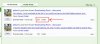
Yep I get the same response, even though I did put a tick in the little box to select it.One other thing: in the quick reply box there's a button to link to or quote a bookmarked message, which seemed a nice feature - except that I couldn't get it to work. It kept saying No Message Selected (or similar). And once I've gone to the further options and preview, the button isn't there any more.
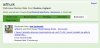
It does if I go the way you suggested, from the user name at the top below the picture of the dog. If I go to my profile page (click user name below the avatar on any of my posts), then click the Bookmarks link, I get this:So yours doesn't have these?
View attachment 3042
Edit to add:
I see you've bookmarked my posts here - well there's nothing to indicate that, which I guess answers my second question.
Yep I get the same doing it that way.It does if I go the way you suggested, from the user name at the top below the picture of the dog. If I go to my profile page (click user name below the avatar on any of my posts), then click the Bookmarks link, I get this: