

If you have not used a forum before – or maybe it had a different set-up to us – then posting a new thread can be a little confusing.
The easiest way is to follow these steps:
Find the section/sub-forum where you want to post your question.
Towards the top right hand corner, you will see this:
Click on that, and a new page appears:
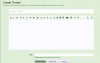
Give your question a title, write the question in the main box and then click on the Create Thread button at the bottom.
Your thread will then appear at the top of the section/sub-forum but also will appear in the New Posts section.
If all else fails, click on the Contact button at the bottom of the page to send a message through to Admin and we will do our best to help.
The easiest way is to follow these steps:
Find the section/sub-forum where you want to post your question.
Towards the top right hand corner, you will see this:
Click on that, and a new page appears:
Give your question a title, write the question in the main box and then click on the Create Thread button at the bottom.
Your thread will then appear at the top of the section/sub-forum but also will appear in the New Posts section.
If all else fails, click on the Contact button at the bottom of the page to send a message through to Admin and we will do our best to help.


 Thank you.